
Auto DJ
Why do some song titles display blank or as "unknown" or get stuck on a previous song?
Check the track's title and artist tags. Older Auto DJ setups can also have a password-related title bug.
On this page 2 sections
Start with the tags in the affected MP3 file. These store the song's title, artist and album. If only some tracks have wrong titles, compare their tags with a track that displays correctly.
The server password contains special characters.
This is an older issue in sc_trans, the legacy Auto DJ software. It is not the default Auto DJ engine now. On a legacy setup, special characters in the server password can cause missing or stuck song titles.
Do not change a server password just to try this old workaround. Ask support to check which Auto DJ engine your account uses and help with the next step.
MP3s affected have invalid, corrupt or missing ID3 tags.
Open the MP3 in a tag editor or a media player that can edit tags. Check Title, Artist and Album. Some apps call Title Name, or Artist Contributing artists. Save the tags before uploading the file. The screenshots below show older Windows and iTunes screens.
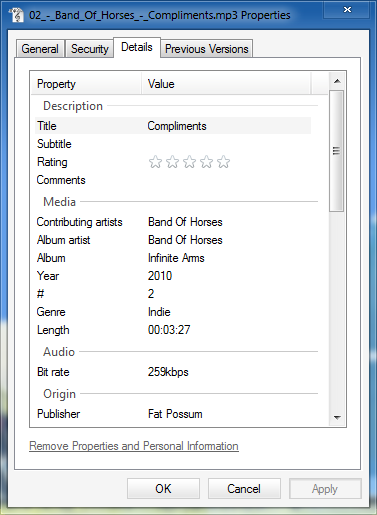
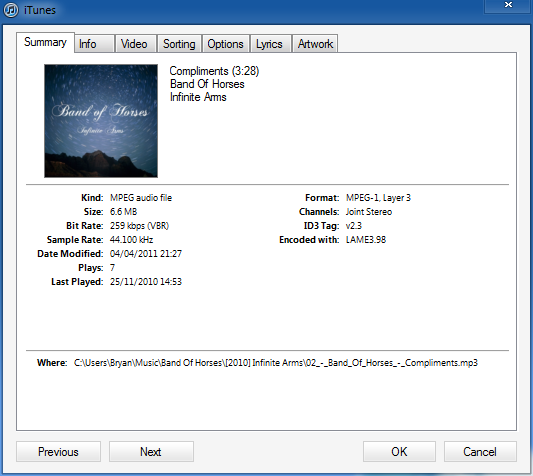
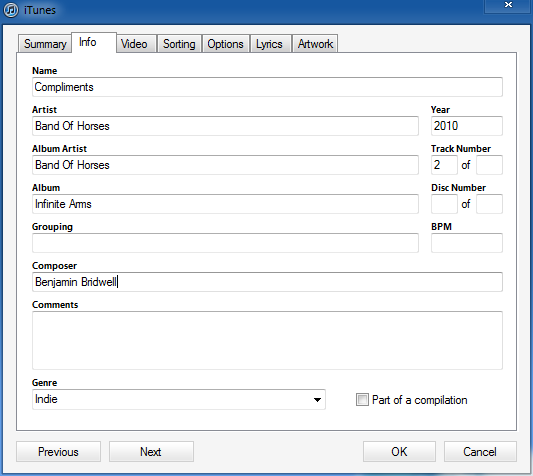
The following MP3 tag limits are from the old sc_trans guide. They apply to legacy setups, not every version of VosCast Auto DJ:
There is support for ID3v1 and ID3v2 tags. With ID3v2 there is support of version 3 and 4 of the specification though there are the following limitations:
- Unsynch data is not supported
- Compressed frames are not supported
- Encrypted frames are not supported
- Appended v4 frames are not supported
Source: http://wiki.winamp.com/wiki/SHOUTcast_DNAS_Transcoder_2#MP3_Files
For most people, you won't need to be concerned about these limitations as most media players and tag editors will write the ID3 tags in formats that can be read by the Auto DJ.